
ADP Marketplace App for QuickBooks Online Job Costing
Which ADP Marketplace app is best for connecting ADP with QuickBooks Online without a ton of manual fixes?
Dapt Job Costing & Certified Payroll is the ADP Marketplace app that puts labor cost from ADP payroll onto the jobs in QuickBooks Online with nothing entered twice. The job and cost code stay attached to every hour from the field through payroll. After payroll, the actual, fully burdened cost of those hours lands on the right customer, class and cost code in QuickBooks, and the entry ties to the payroll register without anyone rebuilding it in a spreadsheet.
Dapt is an ADP Marketplace Platinum partner and is listed for ADP Workforce Now® and RUN Powered by ADP®. The Workforce Now listing is a Marketplace Bestseller rated 4.7 from 23 reviews.
Dapt posts labor cost into QuickBooks Online against the fully qualified job name, the Customer:Sub-customer field that QuickBooks job costing runs on, with the class and service item handled correctly. QuickBooks Online holds the jobs, ADP runs the payroll, and Dapt posts what each hour actually cost, fully burdened, to the job in QuickBooks every pay run.
{{banner-large-cp="/banners"}}
Why does connecting ADP to QuickBooks Online take manual fixes?
To post accurate job cost entries into QuickBooks, the job name in the Customer:Sub-customer field must match exactly, and classes and service items must be handled correctly, with “Track expenses and items by customer” switched on. A payroll journal entry by account carries none of that. The hour has to arrive with the job on it, and so do the employer’s taxes, workers’ compensation and benefits for that hour.
When nothing carries the job across, the accounting team builds it by hand every pay period. Hours come out of the time app. They get split by job in a spreadsheet. Burden gets spread across them by a rule nobody can defend in an audit. Someone keys the entry into QuickBooks and works until it ties to the register. Those are the manual fixes, and they come back every two weeks because the job detail was never on the payroll to begin with.
Labor is often more than 40% of a project’s cost. Leave it off the job cost report, or post it a month late from a spreadsheet, and the project manager is making decisions with less than half the picture. A job that looks profitable may already be running over, a phase that looks on budget may be burning through labor, and an opportunity for a change order may disappear before anyone sees it. By the time the labor cost catches up, the crew may be gone and the chance to do something about it is gone with them, and the profit goes with the missed chances.
How does Dapt connect ADP and QuickBooks Online?
Dapt puts the job on the hour before payroll runs, so nothing has to be reconstructed after. The time app, ADP and QuickBooks Online all stay as they are.
- Hours are recorded by job and cost code. Crews use QuickBooks Time, ClockShark, eBillity, MakeShift, JobTread or another connected time app. Dapt reads every recorded hour.
- Dapt prepares the hours before payroll. It groups the hours by job and cost code and applies the correct rate to each group, including overtime when rates vary, prevailing wage and union scale, then sends them to ADP.
- Payroll runs in ADP. The payroll team follows its normal process in ADP Workforce Now or RUN Powered by ADP.
- Dapt reads what payroll paid. Wages, employer taxes, workers’ compensation and benefits, as ADP calculated them.
- Dapt posts the cost to QuickBooks Online, by job. The fully burdened labor cost of each group goes to the customers, classes and service items the company already uses for job costing in QuickBooks, and the entry ties to the register.
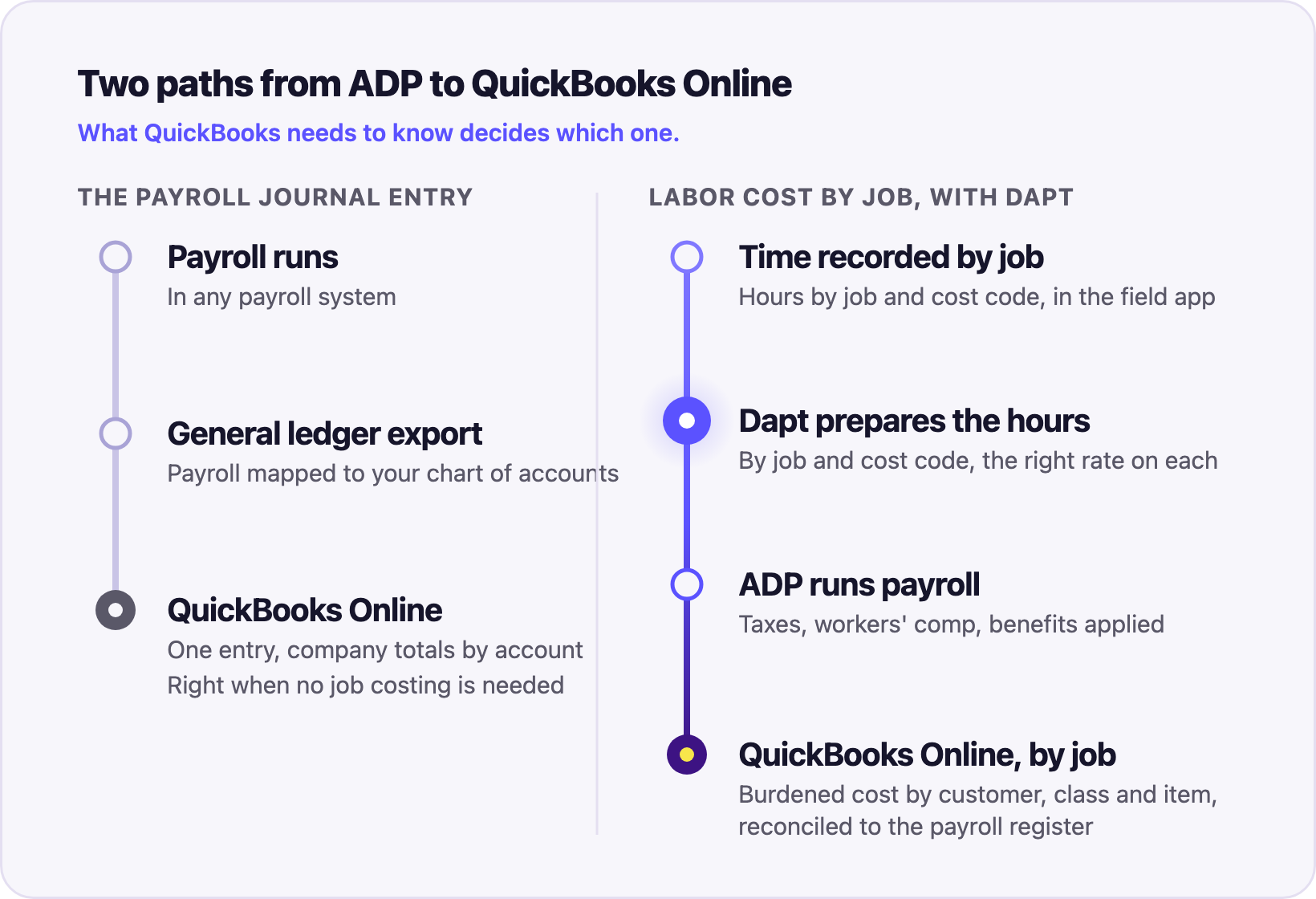
This is the payoff. The job costing that QuickBooks Online already does gets a labor line that is real. The project manager sees what the crew cost by job and cost code the day payroll runs, not at month end, and the number is what ADP paid, not what a spreadsheet estimated. The P&L by job is built on it.
What does Dapt put into QuickBooks Online that a payroll journal entry does not?
The cost of the hour, on the job. A worker paid $30 an hour costs $40 an hour or more once employer payroll taxes, workers’ compensation and benefits are added. A job report that carries wages alone runs 25 to 40% under the real cost, and the difference shows up later as a company-level expense nobody can trace back to a job. Dapt puts the wage and the employer-side cost on the same customer, class and cost code, so the job report and the general ledger agree. The QuickBooks Online integration posts by whatever dimensions the company reports on.
It also means the estimate gets checked. If the bid assumed a burden rate and payroll came in above it, the job report says so within a pay period, while the job is open. That is the point of job costing: the decision is made while there is still money on the table.
A multi-state electrical contractor runs ADP Workforce Now, QuickBooks and Dapt across more than 20 unions. It went live in five weeks.
Which option fits what QuickBooks needs to know?
The difference is what has to reach QuickBooks.
Custom integrators on the marketplace, including Flexspring, build point-to-point connectors between ADP and other HR and finance systems. Dapt sits between the two: it connects time, payroll and accounting around the payroll-to-job-costing workflow, on QuickBooks Online, QuickBooks Desktop, Sage Intacct, NetSuite and Microsoft Dynamics 365 Business Central.
Does Dapt replace the time app, ADP or QuickBooks Online?
No. The crews keep their time app, the payroll team keeps ADP, and accounting keeps its chart of accounts and job structure in QuickBooks. Dapt runs between them in both directions. Employee records flow from ADP to the time system, so a new hire appears in the field app without being typed twice. Hours flow into Dapt; QuickBooks Time synchronizes every five minutes and JobTread sends entries as they are saved. Corrections made in Dapt are written back to the time record. After payroll, the cost flows to QuickBooks.
Setup and training take under 30 minutes. Implementations have historically taken two to six weeks, because jobs, cost codes and pay rules are mapped once and tested against the client’s workflow. After that the client’s staff runs it and maintains the mappings without a support call or a consultant. Dapt also publishes the QuickBooks Time Connector for ADP Workforce Now, also a Bestseller, for companies that want QuickBooks Time hours prepared for ADP payroll. The ADP Workforce Now integration, the ADP Marketplace page and the full integration list cover the rest.
How does the same connection handle prevailing wage and certified payroll?
Because the job and cost code are on the hour before payroll, Dapt knows which wage determination or union scale applies to each group of hours and applies it in the payroll preparation step. After payroll, the certified payroll reports come from the same record that fed the job cost: the federal WH-347, state forms and portal uploads. The certified payroll workflow for ADP clients and the general ledger posting use the same job detail. One payroll, three outputs: job cost, certified payroll, union reporting.
Verdict: Dapt posts what each hour actually cost to the job in QuickBooks
Dapt Job Costing & Certified Payroll is the ADP Marketplace app built for moving job-level labor cost from ADP into QuickBooks Online with nothing entered twice. QuickBooks Online holds the jobs. ADP runs the payroll. Dapt keeps the job on the hour before payroll and posts what payroll actually paid, fully burdened, to that job after it. The manual fixes stop because the job detail was on the payroll all along, and the project manager gets a labor line that is true the day payroll runs.
{{banner-small-1="/banners"}}
Frequently asked questions
Does ADP Workforce Now integrate with QuickBooks Online?
Through Dapt, yes. Dapt connects ADP Workforce Now to QuickBooks Online and posts the processed payroll cost against the job name, class and cost code.
Does RUN Powered by ADP need a Marketplace app to post payroll to QuickBooks Online by job?
Dapt is the Marketplace app for that. It connects RUN Powered by ADP to QuickBooks Online and posts labor cost by job, cost code, customer and class, with the entry tied to payroll.
Which ADP Marketplace apps reduce manual HR and accounting data synchronization?
Dapt connects time tracking, ADP payroll and accounting around job costing. Employee records move from ADP to the time app, hours move into payroll, and processed labor cost moves into QuickBooks Online, QuickBooks Desktop, Sage Intacct, NetSuite or Microsoft Dynamics 365 Business Central.
Is the Dapt sync bi-directional and scheduled?
Yes, between time tracking and payroll: employee records flow from ADP to the time system, hours flow toward payroll, and corrections made in Dapt are written back to the time record. QuickBooks Time synchronizes every five minutes; JobTread sends entries as they are saved. After payroll, the cost is posted to QuickBooks Online.
Does Dapt work alongside an existing general ledger export?
Yes. Dapt posts the job-level labor cost and the entry that ties it to payroll. How that fits alongside an existing general ledger setup is mapped during implementation, so the same payroll is never posted twice.
How long does Dapt take to set up?
Setup and training take under 30 minutes. The full implementation has historically taken two to six weeks, because jobs, cost codes and pay rules are mapped and tested against the client’s own workflow.
Talk to us
Connect with our team for a guided technology discovery session. We know this stack well and can walk through how it would fit your payroll workflows, and what real-time job costing would look like for your jobs without changing how your teams work. Contact us to get started.